PROJECT
Pawlicy Advisor
Research & Experimentation
INDUSTRY
Pet Insurance
E-Commerce
Series A Startup
ROLE
UX Research
Product Design
Data Analysis
Product Management
COLLABORATORS
Marketing
Sales
Customer Support
Engineering
TOOLS
Figma
TryMata
Typeform
ClickUp
YEAR
2022-2023
Pawlicy Advisor is an early-stage pet insurance marketplace startup that serves as a broker for insurance companies, offering pet parents quotes for hundreds of pet health insurance policies, and recommends a policy based on the health concerns of a pet’s breed, age, and location. Although a focus on organic search and partnerships with veterinary clinics were bringing more pet parents to the site than ever, conversion rates weren’t meeting expectations and there was limited understanding of why.

BUILDING A FOUNDATION BASED ON DATA
I joined as the first product hire, responsible for all design and research capabilities. I had a lot to learn about the pet insurance industry so my first priority was to step back and understand the full picture — who our customers were, how they made decisions about pet insurance, and where friction existed in the shopping experience. I spent my first month conducting extensive research with the goal of designing a series of tests and product improvements to serve as the foundation of a long-term UX strategy. This research took about one month and included:
Extensive competitive research into the search experience, product offerings, and language of other insurance marketplaces and pet insurance providers (50+ brands)
Analysis of pet insurance Facebook groups, Google reviews, and online message boards to understand what kind of questions pet parents are asking, which brands were being recommended, and why
Shadowing customer service calls to learn where users were getting stuck and what questions users asked our licensed insurance agents by phone
Live interviews (10+) with pet parents who were and were not Pawlicy users to gain insight into how they pay for their pet’s health care and their understanding of pet insurance
Surveys sent to users a few days after visiting Pawlicy Advisor to learn about their experiences and better define the user journey
Unmoderated user testing of the current site experience to observe users navigating the site while sharing their feedback to understand what actions they take and how they think
Unmoderated user testing of competitor marketplaces and insurance provider sites to see how different search experiences compare
NPS surveys sent post-purchase to establish a baseline for site improvements and new features to come
USER INSIGHTS, PRODUCT TESTS, AND OUTCOMES
In total, this testing and iteration phase took about 6 months total, featuring bi-weekly product updates and dozens of variants. Some highlights and notable findings:
TEST 1: Fewer Options + More Education
Being new to pet insurance myself, it was no surprise that users had a lot to learn. I saw in user testing that pet parents weren’t familiar with how pet insurance works, didn’t recognize the brands (and often assumed that Pawlicy was their insurance provider), and were completely overwhelmed when receiving quotes for 200+ policies. My first round of experimentation focused on addressing these pain points.
The biggest misunderstanding came from the quote detail page, where users saw several plans from each provider that all had different levels of coverage (deductible, reimbursement rate, and coverage limit). And when viewing plans from different providers with different coverage, it was really challenging to make sense of why one plan could cost $22/month and another $300/month. They would select a couple plans to learn more, not see much of a difference (because the items covered would be the same across all plans from a provider), get frustrated, and leave. Users shopped based mainly on price, and hardly ever customized the coverage to fit their needs and budget.
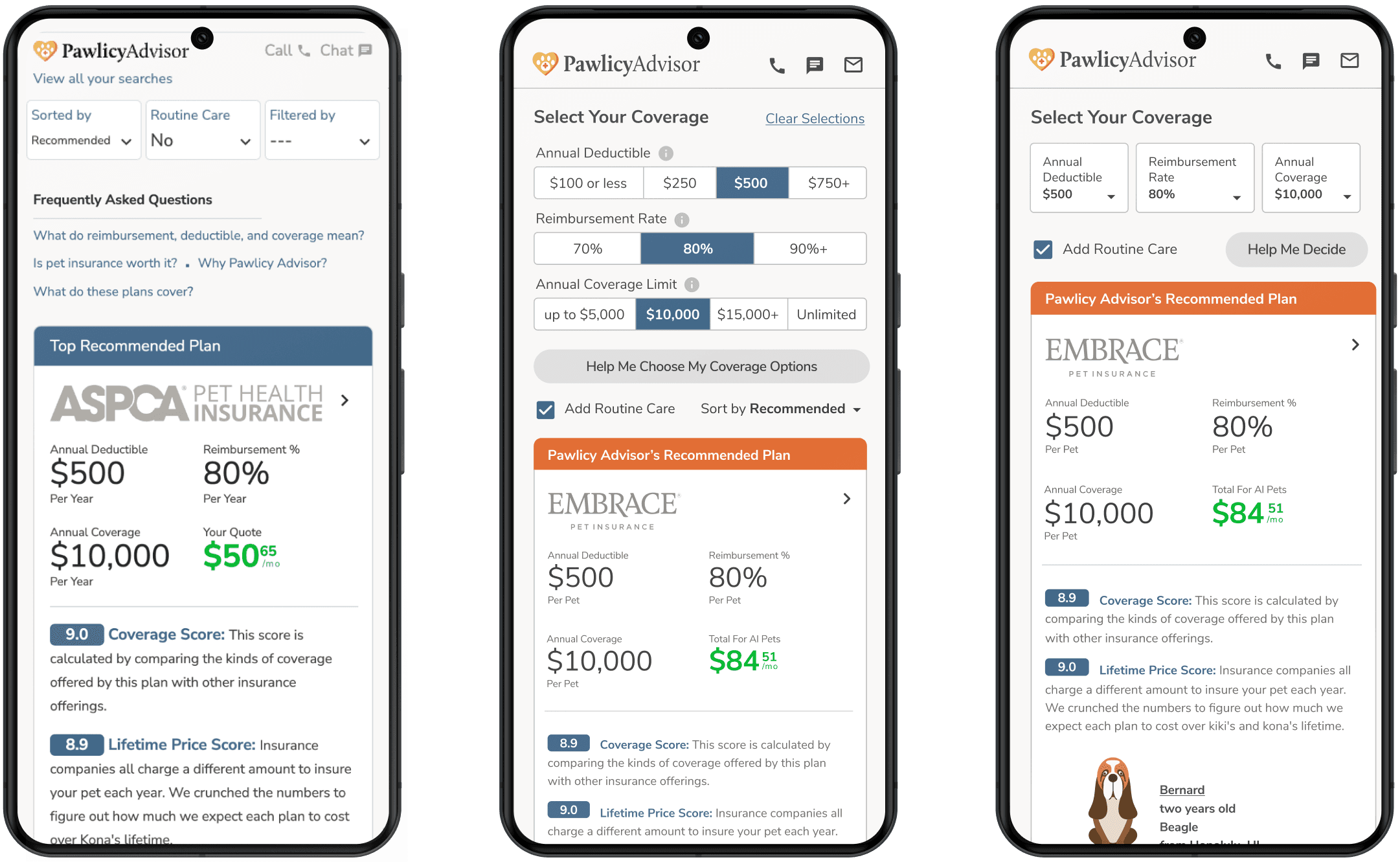
In order to improve this experience, I wanted to put users in a situation where they were only viewing plans with the same deductible, reimbursement rate, and coverage limit. This also meant greatly reducing the number of plans shown at one time. To do this, I redesigned the header of the quote results page with filters to allow users to select a coverage level, and a default recommended coverage that was ‘not too big, not too small’. I hoped that providing these filters would help users discover on their own what goes into an insurance policy and how it affects the price. Several UI options were designed, user tested, and refined to create two variants for the engineering team to build and test in product.
TEST 1 SET UP
CONTOL
Existing quote results page with no sorting or recommendations
VARIANT A
New filter UI with Pawlicy’s coverage recommendation set at the default
VARIANT B
More minimal filter UI that hid options behind a drop down menu, but took up less space
OUTCOME
Variant A beat out the control and Variant B, increasing conversion by 26%. Making the coverage filters very obvious on the quote results page helped users understand that these variables were something they could choose, and also meant they were never looking at more than 8 plans at a time (one per provider).
I anticipated that providing intuitive education for users into how coverage worked would increase their confidence in Pawlicy and help them choose a policy. What I did not expect was that it would lead to users selecting more coverage and higher priced plans. Though we recommended an 80% reimbursement rate, this experiment showed more users selecting 90% reimbursement than ever before. Users were able to play around with options and decide for themselves that more coverage was worth the additional cost. I ran a follow-up test where we recommended 90% reimbursement, and we not only sold more of these policies, but increased the conversion rate another 8% as well. This was especially surprising at a time when other providers started recommending less coverage (70% reimbursement, $5,000 annual limits) on their own sites, likely to decrease the price of the plans and reduce sticker shock.
TEST 2: Usability vs. Decide-ability
When conducting user tests, users clearly understood how to navigate the site. They were familiar with the marketplace model where they entered some information, saw several results, and could select one to purchase. There were a few small UI improvements to make, and language consistency issues to correct, but for the most part, users did not struggle with usability.
Where they did struggle was making a decision about pet insurance. And since we were a marketplace, we had several hurdles to overcome before users could make a purchase. We first had to convince users they need pet insurance, then that a particular provider is a good fit for their pet’s need, then what level of coverage to choose, and finally, that they should buy through pawlicy.com instead of a provider’s website directly. To address this challenge, I shifted the focus of my user testing from usability to decide-ability to better understand how users think through these decisions and what factors would ultimately help them make a purchase.
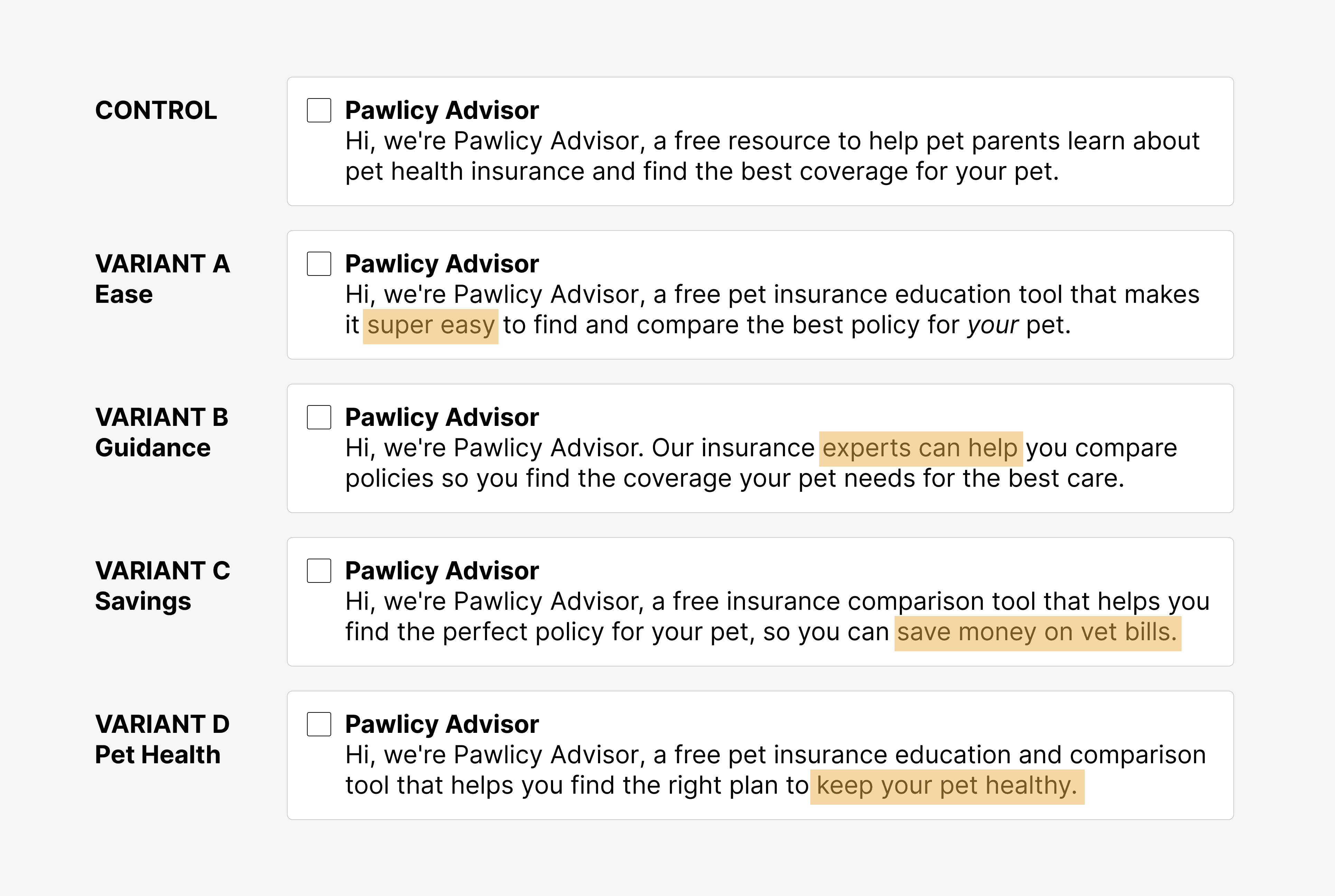
I uncovered several factors that helped users convert, including education about a pet’s health concerns, demonstrating the value of investing in an insurance policy, providing guidance and recommendations, saving money on pet healthcare, keeping your pet healthy, and offering peace of mind.
Before even designing updates to the product flow to test these variants, I conducted an ultra low-lift test with the help of our marketing team. We used our prospecting email and crafted a unique subject line and intro paragraph highlighting each of the ‘decide-ability factors’. After a couple weeks, we had enough data based on email open rates and click throughs to understand which variants resonated best with users. I then designed product solutions for the top 3 performing factors to test.
This approach gave us validation that focusing on ways to help users decide on a policy was worth the effort, and saved us time in designing, building, and testing additional variants that likely would not have performed well. It also allowed me to explore several options around each theme, leading to several product updates and features that were adopted into the user flow. It also helped the marketing team, who used these insights to update emails and advertisements, write blog posts, and produce social media content.
TEST 3: Delivering the right information at the right time
Users came to Pawlicy seeking information– though this looked very different in desktop vs. mobile. Our desktop users spent more time on site, viewed more policies, and tended to want more information. They valued Pawlicy’s ability to provide detailed breakdowns of different providers, with normalized data to make it easy to compare. They wanted all the fine print and weighed many options before selecting a plan.
Mobile users behaved very differently. These users prioritized speed and guidance. They explored fewer plans and were more likely to purchase our recommended plan at the recommended coverage level. These users were overwhelmed with large amounts of data, and preferred short overviews or summaries.
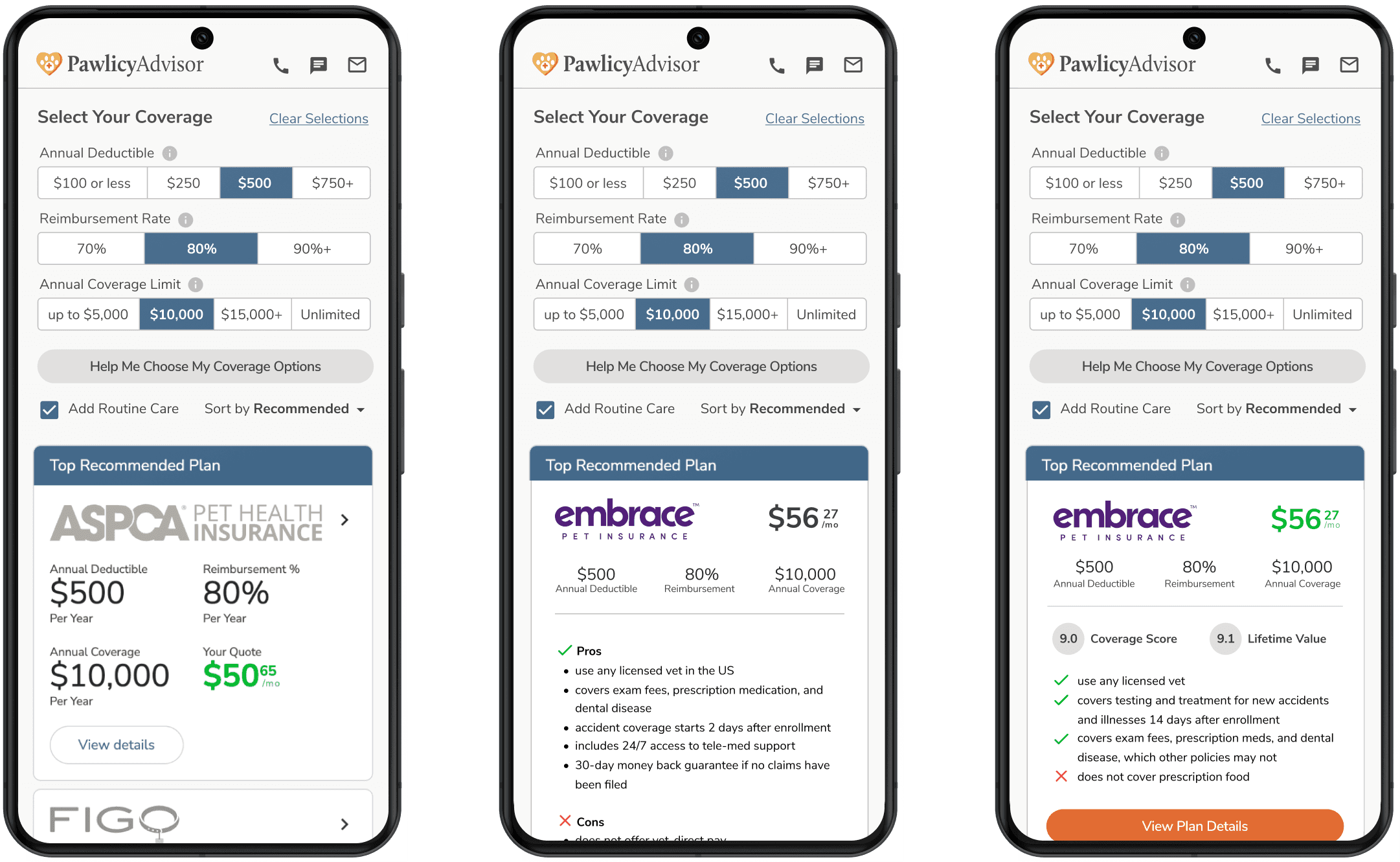
In order to balance the needs of both groups and create a cohesive user experience across devices, I tested the amount of information we included at different points throughout the user journey. One experiment tested policy summaries on our quote overview page, focusing on data that differentiated policies early in the user journey. I hoped that giving users a way to understand policies at a glance would help them select plans they would want to learn more about.
TEST 3 SET UP
CONTOL
Insurance plan cards with no plan details, users make a selection based on brand name and price
VARIANT A
Insurance plan cards with a bulleted overview of the pros and cons of each plan
VARIANT B
Insurance plan cards with a summary of coverage (5-7 most commonly searched items)
OUTCOME
The results of this test were less positive than others. Variant A with the larger amount of text underperformed in both desktop and mobile, and Variant B only slightly improved conversion, but still required a fair amount of screen real estate. With more additions to this page to come, it was not a worthwhile use of our limited space and mental load for users.
FOLLOW UP TEST
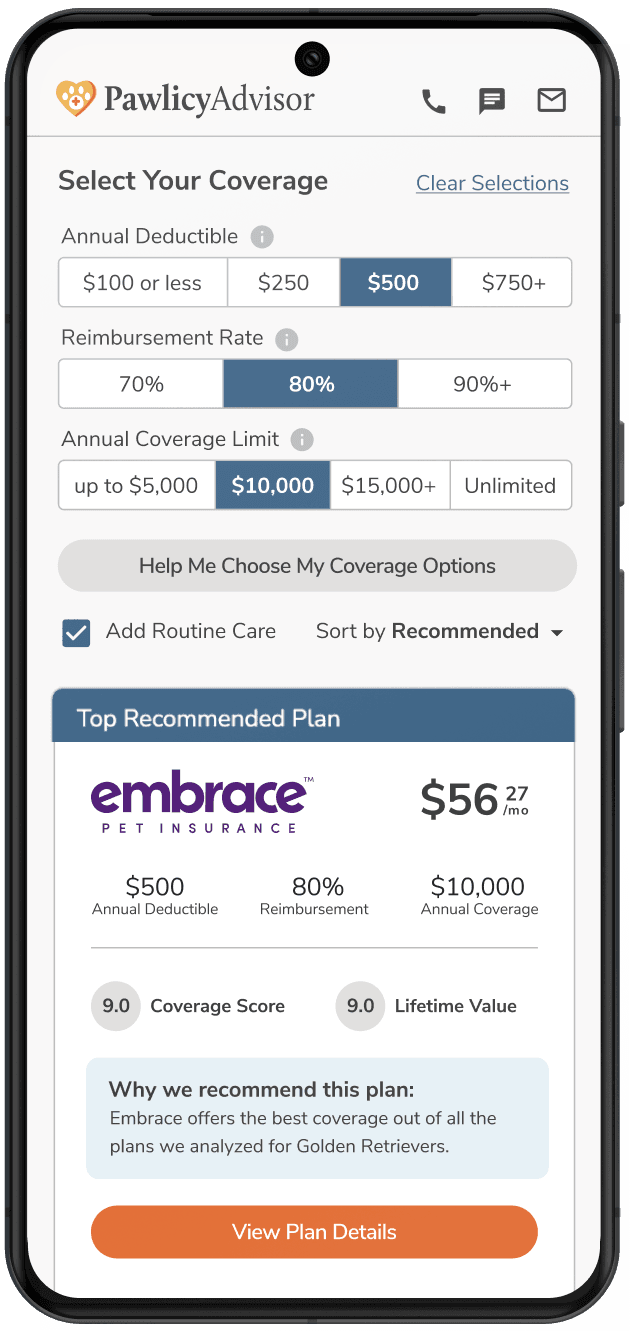
I had a fairly strong conviction that users would benefit from more information at this stage of their shopping experience, so I designed one additional option that took an even more high-level approach to summarizing a policy. For this test, I included a one sentence overview of the policy that explained to users how a plan compared to others (i.e. “[Provider name] offers the best coverage out of all the plans we analyzed for golden retrievers”). This version outperformed both previous variants and the control, helped reinforce Pawlicy’s role as the pet insurance expert, and was adopted as a permanent part of the product experience across desktop and mobile.
RESULTS
This iterative testing approach increased the overall timeline, but also allowed for better understanding of what resonated with our users and helped them convert. While these experiments were in progress, I continued to run unmoderated user tests on the new variants, conduct surveys, speak to users, and fine-tune underperforming variants. This allowed us to validate our approach, one piece at a time, and build on what we learned while also improving key product metrics.
Over the course of these experiments and site improvements, Pawlicy saw:
Best in class NPS score of 76 (other pet insurance companies are in the ballpark of 20-35)
53% cumulative increase in conversion
70% increase in year-over-year annual recurring revenue
84% of users followed our policy recommendations
54% of policies included optional routine care plans (compared to 35% of policies sold directly through insurance providers)
Policies sold through Pawlicy had higher retention over a 2 year period compared to the same policies sold directly through insurance providers
These experiments served as the foundation for the next 18 months of product development at Pawlicy. The validated insights into our users helped in the development of a long-term product roadmap, allowing us to move more quickly and with greater certainty. The research and discovery also shaped the strategy of both sales and marketing teams.